> ## Documentation Index
> Fetch the complete documentation index at: https://moengage-docs-mcp-segmentation-tool-belt.mintlify.site/llms.txt
> Use this file to discover all available pages before exploring further.
# MoEngage MCP Server and Connector
> Connect AI assistants like Claude and ChatGPT to your MoEngage workspace to build campaigns, manage segments and flows, and analyze performance through natural language.
MoEngage offers a hosted [Model Context Protocol (MCP)](https://modelcontextprotocol.io/docs/getting-started/intro) server that lets AI assistants work with your workspace directly. Your assistant can **build campaign drafts, create and count segments, read and analyze flows, browse dashboards, and analyze performance** — all through natural-language conversation.
The MoEngage MCP server is available as a **custom connector** for any MCP-compatible client. We are actively working to list it on the Claude and ChatGPT marketplaces for one-click installation.
The MoEngage AI Connector (MCP server) is available in **DC01, DC02, DC03, and DC04**.
## MCP Server URL
Use this URL wherever a client asks for a remote MCP server or custom connector:
```text theme={null}
https://mcp.moengage.com
```
For the MoEngage **docs** MCP (search the documentation site), use `https://www.moengage.com/docs/mcp`.
The connector runs from the AI provider's cloud (for example, Anthropic's cloud for Claude), not from your local device, so the server must be reachable over the public internet. `https://mcp.moengage.com` is publicly reachable, so no firewall or allowlist changes are needed.
## Setup
There are two ways to make the connector available:
* **Organization-wide setup** — an admin adds MoEngage once for the whole organization, so every member only has to click **Connect**. Recommended for teams.
* **Personal setup** — an individual adds the connector to their own account.
In both cases, each user still authenticates individually with their own MoEngage account, so the assistant only ever sees data and tools that user already has access to.
### Organization-Wide Setup (Admin, One-Time)
Set this up once so anyone in your organization can connect without pasting the URL themselves.
Only a **Primary Owner** or **Owner** of a Claude Team or Enterprise organization can add an organization connector.
1. Go to **Settings** → **Connectors** (organization settings).
2. Click **Add**.
3. Enter the MCP server URL: `https://mcp.moengage.com`.
4. Leave **Advanced settings** (OAuth Client ID and Client Secret) blank — MoEngage handles OAuth automatically.
5. Click **Add**.
The connector now appears in every member's **Connectors** list. Each member clicks **Connect** once to authenticate with their own MoEngage account.
A **workspace admin** (Business, Enterprise, or Edu plan) manages connectors for the workspace.
1. Open **Settings** → **Connectors** (workspace admin settings).
2. Choose to add a **custom** or **third-party MCP connector**.
3. Enter the MCP server URL: `https://mcp.moengage.com`.
4. Save. The connector becomes available to members, who then authenticate individually with their MoEngage accounts.
### Personal Setup (Per User)
Use this if you are connecting your own account, or if the connector has not been added organization-wide.
1. Open **Claude Desktop** or go to [claude.ai](https://claude.ai/login).
2. In the sidebar, click **Settings**.
3. Click **Connectors**.
4. Click **Add custom connector**.
5. Enter the MCP server URL: `https://mcp.moengage.com`.
6. Click **Add**, then **Connect**. You are redirected to authenticate with your MoEngage account.
7. After authentication, the MoEngage tools appear under **Connectors** in **Settings**.
8. Configure **Tool permissions** (*Automatic*, *Ask first*, or *Disabled*) per tool. See [Enable the Tools You Need](#enable-the-tools-you-need).
1. Open [ChatGPT](https://chatgpt.com/).
2. In the sidebar, click **Settings**.
3. Select **Connectors** (or **Connected apps**, depending on your plan).
4. Click **Add**, then choose **Custom MCP Connector**.
5. Enter the MCP server URL: `https://mcp.moengage.com`.
6. Click **Connect** and authenticate with your MoEngage account.
7. After authentication, the MoEngage tools are available in your conversations.
Requires **VS Code 1.101 or later** (remote MCP + OAuth support), and Copilot **agent mode**.
1. In VS Code, open the Command Palette and run **MCP: Add Server** (or edit `.vscode/mcp.json` directly).
2. Choose **HTTP (remote server)** and enter the URL: `https://mcp.moengage.com`.
3. Save. On the server entry in `mcp.json`, click **Auth** (CodeLens) — a browser window opens to authenticate with your MoEngage account.
4. Open **Copilot Chat**, switch to **Agent** mode, and the MoEngage tools appear in the tools picker.
Other Copilot IDEs (Visual Studio, JetBrains, Xcode, Eclipse) currently connect MCP servers with a personal access token only; OAuth support is rolling out. Because this server is OAuth-based, **VS Code is the supported Copilot client today.**
### Use It in a Conversation
After connecting, turn the MoEngage tools on for a chat:
1. In a new conversation, open the tools or connectors menu (in Claude, the **+** icon → **Connectors**).
2. Toggle **MoEngage** on.
3. Ask for what you want in plain language (see [Example Prompts](#example-prompts)).
## Authentication
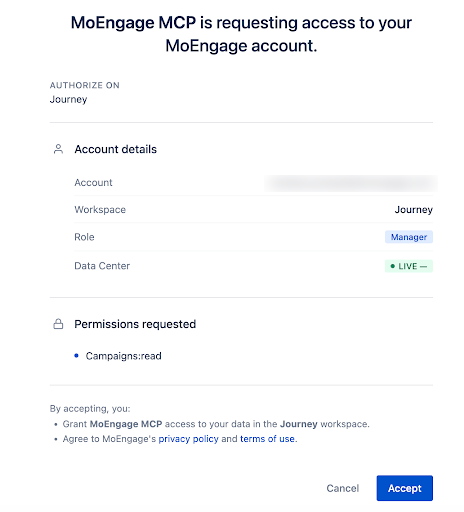
The MoEngage MCP server uses OAuth-based authentication tied to your MoEngage account. The first time you connect, you authenticate with your MoEngage credentials; if you are already signed in, you see an authorization prompt. The screen shows:
* **Account** — your MoEngage email
* **Workspace** — the workspace you are currently signed into
* **Role** — your role in that workspace (for example, Manager, Admin)
* **Data Center** — your data center environment
* **Permissions requested** — the scopes the server needs
Click **Accept** to grant access.
 ### Key Authentication Behaviors
* The server inherits the **environment**, **workspace**, and **role** of your active MoEngage session.
* Authentication tokens are derived from your active MoEngage session.
* If you **log out** or **switch workspaces**, you are prompted to **re-authenticate**.
* All actions respect your existing MoEngage role-based permissions — including which tools your role can use. Reading data requires read access; building or editing requires the matching create/manage permission.
The authorization screen may list a read scope (for example, campaign read) even though the connector exposes many more tools, including write tools. This is a display limitation, not a restriction on what you can do. Which tools actually run is governed by your MoEngage role and by the tools you enable in your client. See [Enable the Tools You Need](#enable-the-tools-you-need).
## Built for Agents
The server is designed so that *any* AI assistant — not just one vendor's — can act correctly on the first try. Two capabilities make that possible:
* **`discover_schema`** returns the exact, current request shape for whatever you're building (required fields, allowed values, a working example) — so the assistant doesn't guess.
* **`get_content_guide`** serves validated, on-demand guidance for writing content (Jinja personalization, email HTML) — so the content is correct, not trial-and-error.
The MCP builds and validates **drafts**. Publishing a campaign, and starting or stopping a flow, remain human actions in the MoEngage dashboard for anything the tools don't explicitly cover.
## What You Can Do
Draft push and email campaigns — including A/B variants, multi-locale, scheduling, segmentation, and content blocks.
Get validated patterns for Jinja personalization and email HTML, and preview how content renders for sample users.
Create custom segments, browse existing ones, and get live user counts with channel reachability.
Search flows, read their configuration and versions, analyze flow and per-channel performance, and pause or resume them.
Find campaigns across every channel; read a campaign's full configuration and content.
Pull campaign performance, delivery funnels, click breakdowns, device analytics, and dashboard charts.
Run behavior, funnel, and retention analyses on product events, and discover the events and attributes to use.
## Available Tools
Create, edit, and test-send are supported for **Push and Email**. Search and analytics work for **all channels** (Push, Email, SMS, WhatsApp, Webhook); SMS and other non‑Push/Email channels are read-only for campaign creation.
Which tools you can use depends on your MoEngage role. If a tool you expect is missing, [refresh the tools list](#refresh-the-tools-list).
### Build a Campaign
| Tool | Description |
| ---------------------------------------------------- | -------------------------------------------------------------------------------------------------------------------------------------------------------------------------------------------------------------------- |
| `discover_schema` | Returns the exact request shape for a campaign type, component, template, or modifier — required/forbidden fields, a proven minimum example, and the rules for that type. **Call this before building any payload.** |
| `create_campaign_draft` | Create a campaign draft in one call. |
| `patch_campaign_components` | Update one or more components of an existing draft. |
| `validate_campaign_draft` | Dry-run the full publish validation against a draft without changing it; returns field-level errors if anything is missing. |
| `create_personalization_preview` | Render personalization for sample users to spot-check content before creating. |
| `test_campaign_inline` / `test_campaign_by_draft_id` | Send a test message to verify a draft. |
| `update_campaign_status` | STOP, PAUSE, or RESUME an already-running campaign (not drafts). |
### Author Content
| Tool | Description |
| ------------------- | -------------------------------------------------------------------------------------------------------------------------------------------------------------------------------------------------------------------------------------------------------------------------------------------------------------------------------------- |
| `get_content_guide` | Validated authoring guidance for content — how to write Jinja personalization and email HTML well. Request a `topic` (`jinja`, `email_html`, `email_deliverability`) and an optional `section` to get just the part you need. This is authoring *quality* guidance, distinct from `discover_schema` (which gives the request *shape*). |
### Content Blocks
| Tool | Description |
| ----------------------------------------------------- | ------------------------------------------------------------------------------- |
| `create_content_block` / `edit_content_block` | Create or update a reusable content block (for example, a shared email footer). |
| `search_content_blocks` / `get_content_blocks_by_ids` | Find content blocks by label, or fetch them by ID. |
### Segments
| Tool | Description |
| ----------------------------------------------------------------------- | ---------------------------------------------------------------------------------------------------------------------------------------------------------------------------------------------------------------------------------------------------------------------------------------------------------------------------------------------------------------------------------------------------------------------- |
| `create_custom_segment` | Creates a filter-based (ELASTIC\_SEARCH) custom segment from `included_filters` / `excluded_filters`. The segment `name` must be unique, under 200 characters, and contain no HTML (`All Users` is reserved). Names inside filters are not validated at create time by default — a wrong name is accepted, and the segment count fails later with no error reason. |
| `list_segments` | Browse existing segments, paginated (`page`, `page_size`, optional `name` filter). Returns Filter and File type segments only, as metadata (`id`, `name`, `type`, `source`, timestamps); Warehouse, Analytics, and Composite are excluded. |
| `get_segment` | Read a single segment's full filter definition by ID, in the same format `create_custom_segment` accepts. File-based and cohort-import segments return metadata only, with no filter tree. |
| `start_segment_count` / `poll_segment_count` | Kick off an async user count for a segment (with an optional `callback_url` webhook), then poll for the result — includes channel-level reachability, with per-channel and per-platform breakdowns available. Results are cached for 15 minutes; jobs typically finish in under 30 seconds. |
| `get_value_suggestions` | Gets up to 5,000 distinct stored values (`string`, `double`, or array/object variants) for a user or event attribute, useful for checking real values before writing an equality filter. For `array_object` attributes, `node_attribute_name` / `node_data_type` resolve values for a child field. |
| `describe_segment_filters` | Turns a filter set into a plain-English sentence to confirm intent before creating a segment or query. Its `filter_operator` also accepts `difference`, unlike `create_custom_segment`. |
| `deep_validate_segment_filters` | Semantically validates a filter set (attribute existence, data types, operators) against the workspace's live catalog. **Always returns HTTP 200** — check the `is_valid` field in the response, not the status code; on failure, `errors` gives the dot-notation path of each problem. |
| `create_recent_query` / `get_recent_query` / `get_recent_query_filters` | Count an audience **without creating a segment**: run an ad-hoc audience query (optionally restricted to specific `platforms`, or linked to an existing segment via `cs_id`), poll its result (`status`: `success` or `failure`), and read back its filters. Identical requests are deduplicated for 15 minutes; reachability is computed for all four channels regardless of the `reachability` parameter's contents. |
| `is_user_in_segment` | Check in real time whether a specific user is in up to 10 segments. `segment_eligibility: false` means the segment type doesn't support real-time evaluation (batch-only) — it is not a "no". |
* Segment filters must use the exact **internal** (platform) names of events and attributes, not the dashboard display name (for example, `moe_city`, not "City"). A display name is often accepted at create time, but the count later fails with **no error reason**. Resolve names first with `find_events`, `find_user_attributes`, and `find_event_attributes` (see [Catalog Discovery](#catalog-discovery)), and always use the returned `name` field.
* To target users who did **not** perform an event, don't set `executed: false` on an `actions` filter — it is silently ignored. Place a positive `actions` filter in `excluded_filters` instead, or use `"execution": {"type": "atmost", "count": 0}`. Common create-time errors: `409` (name already taken), `400` (malformed filter, or the operator `equals` instead of `is`), `413` (filter too large or too deeply nested).
### Flows
| Tool | Description |
| ------------------------------- | --------------------------------------------------------------------------------------------------- |
| `search_flows` | Find flows by name, status, or other criteria. |
| `get_flow` / `get_flow_version` | Read a flow's configuration, or a specific version of it. |
| `get_flow_analytics` | The flow-level health view — how the flow is performing overall. |
| `get_flow_channel_analytics` | Channel-scoped analytics for a flow — how Email, Push, SMS, and other channels performed within it. |
| `update_flow_status` | Pause or stop a flow. |
### Dashboards
| Tool | Description |
| ----------------- | ------------------------------------------------------------------ |
| `list_dashboards` | List the analytics dashboards available in the workspace. |
| `get_dashboard` | Return the full metadata for a single dashboard by ID. |
| `get_chart_data` | Fetch the analytical data for a specific chart within a dashboard. |
### Search & Read
| Tool | Description |
| ------------------------------------ | ---------------------------------------------------------------------------------------------------------------------------------------------------- |
| `search_campaigns` | Search campaigns across all channels by name, status, ID, channel, delivery type, or date range. Include `DRAFT` in the status filter to see drafts. |
| `get_campaign` / `get_campaign_meta` | Fetch a single campaign's full configuration and content, or just its metadata. |
**Supported status filters:** `ACTIVE`, `DRAFT`, `EXPIRED`, `NOT_SENT`, `PAUSED`, `SCHEDULED`, `SENDING`, `SENT`, `STOPPED`, `UNDER_REVIEW`, `REJECTED`.
### Campaign Analytics
All analytics tools enforce a maximum date range of **30 days**.
| Tool | Description |
| ----------------------------- | --------------------------------------------------------------------------------------------------------------------- |
| `get_campaign_stats` | Aggregate performance — delivery rate, opens, clicks, CTR, and channel-specific metrics. Up to 50 campaigns per call. |
| `get_detailed_campaign_stats` | Breakdowns by conversion goal, device/platform, locale, and A/B variation. |
| `get_delivery_stats` | The delivery funnel — reachable users, frequency-cap removals, send/delivery failures, and per-platform device stats. |
| `get_click_performance` | Per-URL click breakdown, with total and unique counts. |
| `get_device_analytics` | Performance by device dimensions — OEM, app version, or dormancy, with multi-dimensional splits. |
### Product Behavior Analytics (Beta)
These tools are newer and still in beta — names and response shapes may still change. If you don't see them yet, [refresh the tools list](#refresh-the-tools-list).
| Tool | Description |
| ------------------------- | ------------------------------------------------------------------------------------------------------- |
| `discover_analyze_schema` | Returns the request shape for a behavior, funnel, or retention analysis — call this before running one. |
| `run_behavior_analysis` | Analyze how users perform a chosen event over time. |
| `run_funnel_analysis` | Measure conversion across an ordered sequence of events. |
| `run_retention_analysis` | Measure how users return over time after a starting event. |
### Catalog Discovery
Use these to find the right events and attributes before building a segment or running a behavior analysis. All three return top-ranked matches with confidence scores, never the full catalog; event and attribute names vary per workspace, so the assistant should never guess them.
| Tool | Description |
| ----------------------- | ------------------------------------------------------------------------------------------------------------------------------------------------------------------------------------------------------------------------------------------------------------------- |
| `find_events` | Discover trackable events matching a natural-language term (for example, "purchase"). Takes `query` and an optional `limit` (1–50, default 10); returns the internal `name` to use as `action_name` in filters. Events inactive for more than 60 days are excluded. |
| `find_event_attributes` | Discover the attributes of a specific event. Takes `event_name` (the exact name from `find_events`), `query`, and an optional `limit`. |
| `find_user_attributes` | Discover user attributes matching a natural-language term (for example, "city"). Takes `query` and an optional `limit`; returns the internal `name` and `data_type`, which determines valid filter operators. |
### Feedback
| Tool | Description |
| ----------------- | ----------------------------------------------------------------------------------------- |
| `submit_feedback` | Lets the assistant report tool-quality issues back to MoEngage to help improve the tools. |
## Building a Campaign, Step by Step
The assistant calls `discover_schema` for your channel and delivery type to get the exact payload structure.
Use `find_events` / `find_user_attributes` and `create_custom_segment` (with `start_segment_count` to confirm reach) to target the right users.
For email HTML or Jinja personalization, it calls `get_content_guide` for validated patterns.
`create_campaign_draft` (or `patch_campaign_components` to refine an existing draft).
`create_personalization_preview` confirms the content renders correctly for sample users.
`validate_campaign_draft` runs the full publish check and reports any field-level issues.
Review and publish the draft from the **MoEngage dashboard**.
## Example Prompts
| What you want to do | Example prompt |
| ------------------------ | ------------------------------------------------------------------------------------------------------------------ |
| Build a campaign | *"Draft a one-time push to all users for tomorrow 10am IST titled 'Weekend sale'."* |
| Personalize content | *"Write the email greeting with a first-name fallback and mention the user's city."* |
| Create a segment | *"Create a segment of users who opened an email in the last 7 days but didn't purchase."* |
| Check segment reach | *"How many reachable users are in my 'Cart abandoners' segment?"* |
| Review a flow | *"Show me the steps and current status of the onboarding flow."* |
| Analyze a flow | *"How is the win-back flow performing by channel over the last 2 weeks?"* |
| Check performance | *"What's the CTR for my email campaigns over the last 2 weeks?"* |
| Read a dashboard | *"Pull the numbers from the 'Weekly engagement' dashboard."* |
| Analyze behavior (beta) | *"Run a 7-day retention analysis for users who completed onboarding."* |
| Diagnose delivery | *"Why did my last push campaign have a low delivery rate?"* |
| Device insights | *"How does Android vs iOS performance compare for my push campaigns?"* |
| Explore the catalog | *"What purchase-related events do we track, and what attributes do they have?"* |
| Sanity-check a filter | *"Before creating it, explain in plain English what this segment's filters mean."* |
| Create a segment via MCP | *"Create a segment of users in Mumbai who purchased at least 3 times in the last 30 days."* |
| Count a segment | *"How many reachable users are in my 'Cart abandoners' segment, split by channel?"* |
| Count without creating | *"How many users opened an email in the last 7 days but didn't purchase? Just the count, don't create a segment."* |
| Check membership | *"Is user 12345 currently in the 'Churn risk' segment?"* |
## Known Behaviors and Limitations
We document known quirks so you and your assistant can work around them instead of hitting them unexpectedly.
### Enable the Tools You Need
Write tools (for example, creating campaigns, editing content blocks, creating segments) may be off by default in your client. If the assistant says it lacks access to do something, enable that tool in your client's connector settings — in Claude, under **Settings** → **Connectors** → **MoEngage** → **Tool permissions**. Which tools you can enable is still bounded by your MoEngage role.
### Refresh the Tools List
New tools are added to the connector over time. If a newly shipped tool doesn't appear, refresh the connector's tools list in your client. If the refresh option isn't available, disconnect and reconnect (re-authenticate) the MoEngage connector to pick up the latest tools.
### Segmentation Behaviors
| Behavior | Details |
| ---------------------------------------------------- | -------------------------------------------------------------------------------------------------------------------------------------------------------------------------------------------------------------------------------------------------------------------------------------------------------------------------------------------------------------------------------------------------------------------------------------------------------------------------------------------------------------------------------------------------------------- |
| Internal names only | Filters usually accept display names at create time. `create_custom_segment` has a partial safety-net catalog check, but it fails open when the catalog is unavailable, so an unresolved bad name can still surface later as a count job that fails with no error reason. Always resolve names via `find_events` / `find_user_attributes` / `find_event_attributes` first, and validate with `deep_validate_segment_filters`. |
| Stale events are hidden | `find_events` excludes events inactive for more than 60 days. |
| Text equality uses the `is` operator | The operator `equals` on a `user_attributes` filter is rejected with a generic `400` (Bad Request) error. |
| Negative event conditions require a specific pattern | `executed: false` on an `actions` filter is silently ignored. Express "did not do the event" with a positive filter in `excluded_filters`, or with `"execution": {"type": "atmost", "count": 0}`. |
| Identical recent queries are deduplicated | An identical `create_recent_query` request within 15 minutes returns the same `rq_id` instead of running a new query. |
| Segment types vary in MCP support | `create_custom_segment` only creates filter-based (ELASTIC\_SEARCH) segments. `list_segments` returns Filter and File segments, but excludes Warehouse, Analytics, and Composite. `get_segment` returns a full filter tree only for Filter segments; File and cohort-import segments return metadata only. `is_user_in_segment` evaluates Filter segments in real time; file-based, funnel, retention, and predictive segments are batch-only. See [Types of Segments](/user-guide/segment/basics-of-segmentation/types-of-segments) for what each type means. |
| Counts are cached for 15 minutes | `start_segment_count` returns the cached result (`served_from_cache: true`) when a successful count already exists within the window. |
| Validation returns HTTP 200 either way | For `deep_validate_segment_filters`, check `is_valid` in the response body. |
| Value suggestions are capped | 5,000 distinct values per attribute. |
| Role-based permissions apply | Creating segments and queries requires the matching create/manage permission on your MoEngage role; read tools require read access. See [Security and Permissions](#security-and-permissions). |
### Segmentation Limits
The segmentation tools do not enforce rate limits of their own; the limits below come from the MoEngage APIs they call. There is no published quota on how many segments or queries you can create in a period, no enforced minimum interval between polls, and no documented cap on concurrent count jobs.
| Limit | Value |
| ------------------------------------------------ | ------------------------------------------------------------------------------------ |
| Segments evaluated per `is_user_in_segment` call | 10 |
| Values returned by `get_value_suggestions` | 5,000 distinct values |
| Segments returned per `list_segments` page | 1 to 100 (default 10) |
| Segment count result cache | 15 minutes |
| `create_recent_query` deduplication window | 15 minutes (an identical request returns the same `rq_id`) |
| Filter payload size | Oversized or overly deep filters are rejected with a `413` (Payload Too Large) error |
| Filter nesting depth | One level of `nested_filters` |
Rate limiting can still occur at the platform level.
Some segmentation APIs, including the real-time membership check, can return a `429` (Too Many Requests) error under heavy traffic. There is no published request quota; when a `429` occurs, retry after about 60 seconds. All tool calls also pass through the MoEngage API gateway, which can apply its own traffic controls.
### Other Limitations
* **Publishing** a campaign is not available through the MCP — drafts are published from the MoEngage dashboard.
* **SMS and other non-Push/Email channels** are read-only for creation: searchable and analyzable, but not creatable.
* **Date range** for analytics is limited to **30 days** per query.
* **Batch size**: `get_campaign_stats` accepts up to **50 campaign IDs** per request.
* **Content size**: email HTML can be large (10–50 KB); fetch full content deliberately.
* **Campaign-name date format**: campaign names often encode dates as **DDMMYY** (for example, `230326` = 23 March 2026). If analytics return all zeros, check your date range first.
* **Analytics response shape**: stats are returned as a single cross-channel structure — metrics that don't apply to a campaign's channel come back as `0`, not absent. Don't infer a campaign's channel from which fields are non-zero.
## Security and Permissions
* The MCP server can **build and validate drafts**, **create segments**, and **read and analyze** campaigns, flows, and dashboards. It does **not** publish campaigns — publishing is a human action in the dashboard.
* Every action is scoped to the **workspace and role** of the authenticated user. Tools your role lacks permission for are not available to you.
* Data shared with AI assistants is subject to the respective AI provider's data-handling policies. MoEngage lists its AI [sub-processors](https://www.moengage.com/moengage-list-of-sub-processors/) (including Anthropic and OpenAI) on its website.
* Review MoEngage's [Privacy Policy](https://www.moengage.com/privacy-policy/) and [Terms of Use](https://www.moengage.com/terms-of-use/) for more information.
## Troubleshooting
The server inherits the active session from your MoEngage account.
1. Verify you are signed in to the correct MoEngage workspace.
2. If you signed out or switched workspaces, re-authenticate the MCP connection to restore access.
First, make sure the tool is **enabled** in your client's connector settings — see [Enable the Tools You Need](#enable-the-tools-you-need). Then confirm your MoEngage role has the matching permission (for example, campaign create/manage for build tools). If it's a newly announced tool, [refresh the tools list](#refresh-the-tools-list).
Refresh the connector's tools list, or disconnect and reconnect the MoEngage connector to re-authenticate. See [Refresh the Tools List](#refresh-the-tools-list).
Switching the workspace or database on an active connection can briefly error. Wait a short while and re-authenticate — the connection typically succeeds on retry.
This almost always means a filter uses a display name instead of an internal name. Resolve names with [Catalog Discovery](#catalog-discovery) and re-validate with `deep_validate_segment_filters` before creating the segment again.
Check the response for a specific error code: `409` means the name is already taken, `400` means the filter structure is malformed, and `413` means the filter is too large or deeply nested. A `400` on a filter that otherwise appears correct is often the operator: use `is`, not `equals`, for text equality. See the common-errors note under [Segments](#segments).
This is not a "no": it means the segment type does not support real-time evaluation (file-based, funnel, retention, and predictive segments are batch-only). Check the segment's type, or fall back to a saved count with `start_segment_count`.
Tool availability depends on your MoEngage role and your client's connector settings. See [Security and Permissions](#security-and-permissions) and [Enable the Tools You Need](#enable-the-tools-you-need).
### Key Authentication Behaviors
* The server inherits the **environment**, **workspace**, and **role** of your active MoEngage session.
* Authentication tokens are derived from your active MoEngage session.
* If you **log out** or **switch workspaces**, you are prompted to **re-authenticate**.
* All actions respect your existing MoEngage role-based permissions — including which tools your role can use. Reading data requires read access; building or editing requires the matching create/manage permission.
The authorization screen may list a read scope (for example, campaign read) even though the connector exposes many more tools, including write tools. This is a display limitation, not a restriction on what you can do. Which tools actually run is governed by your MoEngage role and by the tools you enable in your client. See [Enable the Tools You Need](#enable-the-tools-you-need).
## Built for Agents
The server is designed so that *any* AI assistant — not just one vendor's — can act correctly on the first try. Two capabilities make that possible:
* **`discover_schema`** returns the exact, current request shape for whatever you're building (required fields, allowed values, a working example) — so the assistant doesn't guess.
* **`get_content_guide`** serves validated, on-demand guidance for writing content (Jinja personalization, email HTML) — so the content is correct, not trial-and-error.
The MCP builds and validates **drafts**. Publishing a campaign, and starting or stopping a flow, remain human actions in the MoEngage dashboard for anything the tools don't explicitly cover.
## What You Can Do
Draft push and email campaigns — including A/B variants, multi-locale, scheduling, segmentation, and content blocks.
Get validated patterns for Jinja personalization and email HTML, and preview how content renders for sample users.
Create custom segments, browse existing ones, and get live user counts with channel reachability.
Search flows, read their configuration and versions, analyze flow and per-channel performance, and pause or resume them.
Find campaigns across every channel; read a campaign's full configuration and content.
Pull campaign performance, delivery funnels, click breakdowns, device analytics, and dashboard charts.
Run behavior, funnel, and retention analyses on product events, and discover the events and attributes to use.
## Available Tools
Create, edit, and test-send are supported for **Push and Email**. Search and analytics work for **all channels** (Push, Email, SMS, WhatsApp, Webhook); SMS and other non‑Push/Email channels are read-only for campaign creation.
Which tools you can use depends on your MoEngage role. If a tool you expect is missing, [refresh the tools list](#refresh-the-tools-list).
### Build a Campaign
| Tool | Description |
| ---------------------------------------------------- | -------------------------------------------------------------------------------------------------------------------------------------------------------------------------------------------------------------------- |
| `discover_schema` | Returns the exact request shape for a campaign type, component, template, or modifier — required/forbidden fields, a proven minimum example, and the rules for that type. **Call this before building any payload.** |
| `create_campaign_draft` | Create a campaign draft in one call. |
| `patch_campaign_components` | Update one or more components of an existing draft. |
| `validate_campaign_draft` | Dry-run the full publish validation against a draft without changing it; returns field-level errors if anything is missing. |
| `create_personalization_preview` | Render personalization for sample users to spot-check content before creating. |
| `test_campaign_inline` / `test_campaign_by_draft_id` | Send a test message to verify a draft. |
| `update_campaign_status` | STOP, PAUSE, or RESUME an already-running campaign (not drafts). |
### Author Content
| Tool | Description |
| ------------------- | -------------------------------------------------------------------------------------------------------------------------------------------------------------------------------------------------------------------------------------------------------------------------------------------------------------------------------------- |
| `get_content_guide` | Validated authoring guidance for content — how to write Jinja personalization and email HTML well. Request a `topic` (`jinja`, `email_html`, `email_deliverability`) and an optional `section` to get just the part you need. This is authoring *quality* guidance, distinct from `discover_schema` (which gives the request *shape*). |
### Content Blocks
| Tool | Description |
| ----------------------------------------------------- | ------------------------------------------------------------------------------- |
| `create_content_block` / `edit_content_block` | Create or update a reusable content block (for example, a shared email footer). |
| `search_content_blocks` / `get_content_blocks_by_ids` | Find content blocks by label, or fetch them by ID. |
### Segments
| Tool | Description |
| ----------------------------------------------------------------------- | ---------------------------------------------------------------------------------------------------------------------------------------------------------------------------------------------------------------------------------------------------------------------------------------------------------------------------------------------------------------------------------------------------------------------- |
| `create_custom_segment` | Creates a filter-based (ELASTIC\_SEARCH) custom segment from `included_filters` / `excluded_filters`. The segment `name` must be unique, under 200 characters, and contain no HTML (`All Users` is reserved). Names inside filters are not validated at create time by default — a wrong name is accepted, and the segment count fails later with no error reason. |
| `list_segments` | Browse existing segments, paginated (`page`, `page_size`, optional `name` filter). Returns Filter and File type segments only, as metadata (`id`, `name`, `type`, `source`, timestamps); Warehouse, Analytics, and Composite are excluded. |
| `get_segment` | Read a single segment's full filter definition by ID, in the same format `create_custom_segment` accepts. File-based and cohort-import segments return metadata only, with no filter tree. |
| `start_segment_count` / `poll_segment_count` | Kick off an async user count for a segment (with an optional `callback_url` webhook), then poll for the result — includes channel-level reachability, with per-channel and per-platform breakdowns available. Results are cached for 15 minutes; jobs typically finish in under 30 seconds. |
| `get_value_suggestions` | Gets up to 5,000 distinct stored values (`string`, `double`, or array/object variants) for a user or event attribute, useful for checking real values before writing an equality filter. For `array_object` attributes, `node_attribute_name` / `node_data_type` resolve values for a child field. |
| `describe_segment_filters` | Turns a filter set into a plain-English sentence to confirm intent before creating a segment or query. Its `filter_operator` also accepts `difference`, unlike `create_custom_segment`. |
| `deep_validate_segment_filters` | Semantically validates a filter set (attribute existence, data types, operators) against the workspace's live catalog. **Always returns HTTP 200** — check the `is_valid` field in the response, not the status code; on failure, `errors` gives the dot-notation path of each problem. |
| `create_recent_query` / `get_recent_query` / `get_recent_query_filters` | Count an audience **without creating a segment**: run an ad-hoc audience query (optionally restricted to specific `platforms`, or linked to an existing segment via `cs_id`), poll its result (`status`: `success` or `failure`), and read back its filters. Identical requests are deduplicated for 15 minutes; reachability is computed for all four channels regardless of the `reachability` parameter's contents. |
| `is_user_in_segment` | Check in real time whether a specific user is in up to 10 segments. `segment_eligibility: false` means the segment type doesn't support real-time evaluation (batch-only) — it is not a "no". |
* Segment filters must use the exact **internal** (platform) names of events and attributes, not the dashboard display name (for example, `moe_city`, not "City"). A display name is often accepted at create time, but the count later fails with **no error reason**. Resolve names first with `find_events`, `find_user_attributes`, and `find_event_attributes` (see [Catalog Discovery](#catalog-discovery)), and always use the returned `name` field.
* To target users who did **not** perform an event, don't set `executed: false` on an `actions` filter — it is silently ignored. Place a positive `actions` filter in `excluded_filters` instead, or use `"execution": {"type": "atmost", "count": 0}`. Common create-time errors: `409` (name already taken), `400` (malformed filter, or the operator `equals` instead of `is`), `413` (filter too large or too deeply nested).
### Flows
| Tool | Description |
| ------------------------------- | --------------------------------------------------------------------------------------------------- |
| `search_flows` | Find flows by name, status, or other criteria. |
| `get_flow` / `get_flow_version` | Read a flow's configuration, or a specific version of it. |
| `get_flow_analytics` | The flow-level health view — how the flow is performing overall. |
| `get_flow_channel_analytics` | Channel-scoped analytics for a flow — how Email, Push, SMS, and other channels performed within it. |
| `update_flow_status` | Pause or stop a flow. |
### Dashboards
| Tool | Description |
| ----------------- | ------------------------------------------------------------------ |
| `list_dashboards` | List the analytics dashboards available in the workspace. |
| `get_dashboard` | Return the full metadata for a single dashboard by ID. |
| `get_chart_data` | Fetch the analytical data for a specific chart within a dashboard. |
### Search & Read
| Tool | Description |
| ------------------------------------ | ---------------------------------------------------------------------------------------------------------------------------------------------------- |
| `search_campaigns` | Search campaigns across all channels by name, status, ID, channel, delivery type, or date range. Include `DRAFT` in the status filter to see drafts. |
| `get_campaign` / `get_campaign_meta` | Fetch a single campaign's full configuration and content, or just its metadata. |
**Supported status filters:** `ACTIVE`, `DRAFT`, `EXPIRED`, `NOT_SENT`, `PAUSED`, `SCHEDULED`, `SENDING`, `SENT`, `STOPPED`, `UNDER_REVIEW`, `REJECTED`.
### Campaign Analytics
All analytics tools enforce a maximum date range of **30 days**.
| Tool | Description |
| ----------------------------- | --------------------------------------------------------------------------------------------------------------------- |
| `get_campaign_stats` | Aggregate performance — delivery rate, opens, clicks, CTR, and channel-specific metrics. Up to 50 campaigns per call. |
| `get_detailed_campaign_stats` | Breakdowns by conversion goal, device/platform, locale, and A/B variation. |
| `get_delivery_stats` | The delivery funnel — reachable users, frequency-cap removals, send/delivery failures, and per-platform device stats. |
| `get_click_performance` | Per-URL click breakdown, with total and unique counts. |
| `get_device_analytics` | Performance by device dimensions — OEM, app version, or dormancy, with multi-dimensional splits. |
### Product Behavior Analytics (Beta)
These tools are newer and still in beta — names and response shapes may still change. If you don't see them yet, [refresh the tools list](#refresh-the-tools-list).
| Tool | Description |
| ------------------------- | ------------------------------------------------------------------------------------------------------- |
| `discover_analyze_schema` | Returns the request shape for a behavior, funnel, or retention analysis — call this before running one. |
| `run_behavior_analysis` | Analyze how users perform a chosen event over time. |
| `run_funnel_analysis` | Measure conversion across an ordered sequence of events. |
| `run_retention_analysis` | Measure how users return over time after a starting event. |
### Catalog Discovery
Use these to find the right events and attributes before building a segment or running a behavior analysis. All three return top-ranked matches with confidence scores, never the full catalog; event and attribute names vary per workspace, so the assistant should never guess them.
| Tool | Description |
| ----------------------- | ------------------------------------------------------------------------------------------------------------------------------------------------------------------------------------------------------------------------------------------------------------------- |
| `find_events` | Discover trackable events matching a natural-language term (for example, "purchase"). Takes `query` and an optional `limit` (1–50, default 10); returns the internal `name` to use as `action_name` in filters. Events inactive for more than 60 days are excluded. |
| `find_event_attributes` | Discover the attributes of a specific event. Takes `event_name` (the exact name from `find_events`), `query`, and an optional `limit`. |
| `find_user_attributes` | Discover user attributes matching a natural-language term (for example, "city"). Takes `query` and an optional `limit`; returns the internal `name` and `data_type`, which determines valid filter operators. |
### Feedback
| Tool | Description |
| ----------------- | ----------------------------------------------------------------------------------------- |
| `submit_feedback` | Lets the assistant report tool-quality issues back to MoEngage to help improve the tools. |
## Building a Campaign, Step by Step
The assistant calls `discover_schema` for your channel and delivery type to get the exact payload structure.
Use `find_events` / `find_user_attributes` and `create_custom_segment` (with `start_segment_count` to confirm reach) to target the right users.
For email HTML or Jinja personalization, it calls `get_content_guide` for validated patterns.
`create_campaign_draft` (or `patch_campaign_components` to refine an existing draft).
`create_personalization_preview` confirms the content renders correctly for sample users.
`validate_campaign_draft` runs the full publish check and reports any field-level issues.
Review and publish the draft from the **MoEngage dashboard**.
## Example Prompts
| What you want to do | Example prompt |
| ------------------------ | ------------------------------------------------------------------------------------------------------------------ |
| Build a campaign | *"Draft a one-time push to all users for tomorrow 10am IST titled 'Weekend sale'."* |
| Personalize content | *"Write the email greeting with a first-name fallback and mention the user's city."* |
| Create a segment | *"Create a segment of users who opened an email in the last 7 days but didn't purchase."* |
| Check segment reach | *"How many reachable users are in my 'Cart abandoners' segment?"* |
| Review a flow | *"Show me the steps and current status of the onboarding flow."* |
| Analyze a flow | *"How is the win-back flow performing by channel over the last 2 weeks?"* |
| Check performance | *"What's the CTR for my email campaigns over the last 2 weeks?"* |
| Read a dashboard | *"Pull the numbers from the 'Weekly engagement' dashboard."* |
| Analyze behavior (beta) | *"Run a 7-day retention analysis for users who completed onboarding."* |
| Diagnose delivery | *"Why did my last push campaign have a low delivery rate?"* |
| Device insights | *"How does Android vs iOS performance compare for my push campaigns?"* |
| Explore the catalog | *"What purchase-related events do we track, and what attributes do they have?"* |
| Sanity-check a filter | *"Before creating it, explain in plain English what this segment's filters mean."* |
| Create a segment via MCP | *"Create a segment of users in Mumbai who purchased at least 3 times in the last 30 days."* |
| Count a segment | *"How many reachable users are in my 'Cart abandoners' segment, split by channel?"* |
| Count without creating | *"How many users opened an email in the last 7 days but didn't purchase? Just the count, don't create a segment."* |
| Check membership | *"Is user 12345 currently in the 'Churn risk' segment?"* |
## Known Behaviors and Limitations
We document known quirks so you and your assistant can work around them instead of hitting them unexpectedly.
### Enable the Tools You Need
Write tools (for example, creating campaigns, editing content blocks, creating segments) may be off by default in your client. If the assistant says it lacks access to do something, enable that tool in your client's connector settings — in Claude, under **Settings** → **Connectors** → **MoEngage** → **Tool permissions**. Which tools you can enable is still bounded by your MoEngage role.
### Refresh the Tools List
New tools are added to the connector over time. If a newly shipped tool doesn't appear, refresh the connector's tools list in your client. If the refresh option isn't available, disconnect and reconnect (re-authenticate) the MoEngage connector to pick up the latest tools.
### Segmentation Behaviors
| Behavior | Details |
| ---------------------------------------------------- | -------------------------------------------------------------------------------------------------------------------------------------------------------------------------------------------------------------------------------------------------------------------------------------------------------------------------------------------------------------------------------------------------------------------------------------------------------------------------------------------------------------------------------------------------------------- |
| Internal names only | Filters usually accept display names at create time. `create_custom_segment` has a partial safety-net catalog check, but it fails open when the catalog is unavailable, so an unresolved bad name can still surface later as a count job that fails with no error reason. Always resolve names via `find_events` / `find_user_attributes` / `find_event_attributes` first, and validate with `deep_validate_segment_filters`. |
| Stale events are hidden | `find_events` excludes events inactive for more than 60 days. |
| Text equality uses the `is` operator | The operator `equals` on a `user_attributes` filter is rejected with a generic `400` (Bad Request) error. |
| Negative event conditions require a specific pattern | `executed: false` on an `actions` filter is silently ignored. Express "did not do the event" with a positive filter in `excluded_filters`, or with `"execution": {"type": "atmost", "count": 0}`. |
| Identical recent queries are deduplicated | An identical `create_recent_query` request within 15 minutes returns the same `rq_id` instead of running a new query. |
| Segment types vary in MCP support | `create_custom_segment` only creates filter-based (ELASTIC\_SEARCH) segments. `list_segments` returns Filter and File segments, but excludes Warehouse, Analytics, and Composite. `get_segment` returns a full filter tree only for Filter segments; File and cohort-import segments return metadata only. `is_user_in_segment` evaluates Filter segments in real time; file-based, funnel, retention, and predictive segments are batch-only. See [Types of Segments](/user-guide/segment/basics-of-segmentation/types-of-segments) for what each type means. |
| Counts are cached for 15 minutes | `start_segment_count` returns the cached result (`served_from_cache: true`) when a successful count already exists within the window. |
| Validation returns HTTP 200 either way | For `deep_validate_segment_filters`, check `is_valid` in the response body. |
| Value suggestions are capped | 5,000 distinct values per attribute. |
| Role-based permissions apply | Creating segments and queries requires the matching create/manage permission on your MoEngage role; read tools require read access. See [Security and Permissions](#security-and-permissions). |
### Segmentation Limits
The segmentation tools do not enforce rate limits of their own; the limits below come from the MoEngage APIs they call. There is no published quota on how many segments or queries you can create in a period, no enforced minimum interval between polls, and no documented cap on concurrent count jobs.
| Limit | Value |
| ------------------------------------------------ | ------------------------------------------------------------------------------------ |
| Segments evaluated per `is_user_in_segment` call | 10 |
| Values returned by `get_value_suggestions` | 5,000 distinct values |
| Segments returned per `list_segments` page | 1 to 100 (default 10) |
| Segment count result cache | 15 minutes |
| `create_recent_query` deduplication window | 15 minutes (an identical request returns the same `rq_id`) |
| Filter payload size | Oversized or overly deep filters are rejected with a `413` (Payload Too Large) error |
| Filter nesting depth | One level of `nested_filters` |
Rate limiting can still occur at the platform level.
Some segmentation APIs, including the real-time membership check, can return a `429` (Too Many Requests) error under heavy traffic. There is no published request quota; when a `429` occurs, retry after about 60 seconds. All tool calls also pass through the MoEngage API gateway, which can apply its own traffic controls.
### Other Limitations
* **Publishing** a campaign is not available through the MCP — drafts are published from the MoEngage dashboard.
* **SMS and other non-Push/Email channels** are read-only for creation: searchable and analyzable, but not creatable.
* **Date range** for analytics is limited to **30 days** per query.
* **Batch size**: `get_campaign_stats` accepts up to **50 campaign IDs** per request.
* **Content size**: email HTML can be large (10–50 KB); fetch full content deliberately.
* **Campaign-name date format**: campaign names often encode dates as **DDMMYY** (for example, `230326` = 23 March 2026). If analytics return all zeros, check your date range first.
* **Analytics response shape**: stats are returned as a single cross-channel structure — metrics that don't apply to a campaign's channel come back as `0`, not absent. Don't infer a campaign's channel from which fields are non-zero.
## Security and Permissions
* The MCP server can **build and validate drafts**, **create segments**, and **read and analyze** campaigns, flows, and dashboards. It does **not** publish campaigns — publishing is a human action in the dashboard.
* Every action is scoped to the **workspace and role** of the authenticated user. Tools your role lacks permission for are not available to you.
* Data shared with AI assistants is subject to the respective AI provider's data-handling policies. MoEngage lists its AI [sub-processors](https://www.moengage.com/moengage-list-of-sub-processors/) (including Anthropic and OpenAI) on its website.
* Review MoEngage's [Privacy Policy](https://www.moengage.com/privacy-policy/) and [Terms of Use](https://www.moengage.com/terms-of-use/) for more information.
## Troubleshooting
The server inherits the active session from your MoEngage account.
1. Verify you are signed in to the correct MoEngage workspace.
2. If you signed out or switched workspaces, re-authenticate the MCP connection to restore access.
First, make sure the tool is **enabled** in your client's connector settings — see [Enable the Tools You Need](#enable-the-tools-you-need). Then confirm your MoEngage role has the matching permission (for example, campaign create/manage for build tools). If it's a newly announced tool, [refresh the tools list](#refresh-the-tools-list).
Refresh the connector's tools list, or disconnect and reconnect the MoEngage connector to re-authenticate. See [Refresh the Tools List](#refresh-the-tools-list).
Switching the workspace or database on an active connection can briefly error. Wait a short while and re-authenticate — the connection typically succeeds on retry.
This almost always means a filter uses a display name instead of an internal name. Resolve names with [Catalog Discovery](#catalog-discovery) and re-validate with `deep_validate_segment_filters` before creating the segment again.
Check the response for a specific error code: `409` means the name is already taken, `400` means the filter structure is malformed, and `413` means the filter is too large or deeply nested. A `400` on a filter that otherwise appears correct is often the operator: use `is`, not `equals`, for text equality. See the common-errors note under [Segments](#segments).
This is not a "no": it means the segment type does not support real-time evaluation (file-based, funnel, retention, and predictive segments are batch-only). Check the segment's type, or fall back to a saved count with `start_segment_count`.
Tool availability depends on your MoEngage role and your client's connector settings. See [Security and Permissions](#security-and-permissions) and [Enable the Tools You Need](#enable-the-tools-you-need).